Microsoft has moved at pace to integrate its AI chat assistant Copilot into its products, so it’s no surprise that it’s already making its way into the daily workflow of users worldwide.
But whereas Copilot is focused on integration with Microsoft products and helping users with their day-to-day work tasks, many companies have yet to seize the benefits of Copilot Studio. Here we delve into what it is, and the benefits it can bring to your organisation.
What is Microsoft Copilot Studio?
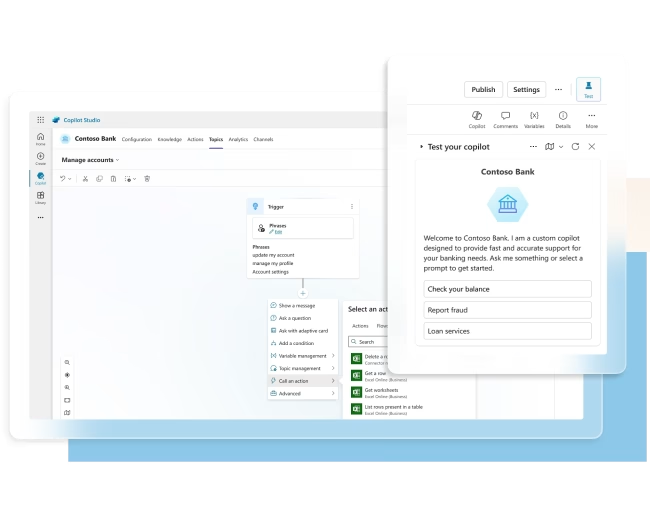
Copilot Studio is a low-code tool that allows organisations to design intelligent, dynamic, and connected AI assistants, in short, custom Copilots. Those agents may be to help your employees or your customers, but vitally they are built to solve issues and improve processes that are relevant to your organisation.
What can you build with Copilot Studio?
We’re all familiar with how Microsoft 365 Copilot works already. It’s embedded with the apps you use daily including Word, PowerPoint, Teams, SharePoint etc and you can use it to create content, summarise meetings, analyse data etc.
Now, Copilot Studio takes things a step further by allowing you to create custom agents (or Copilots) for specific use cases. For example, potential use cases include:
- HR: It could answer questions by referring to HR knowledge bases, policies and contracts to provide easily understandable answers and aid compliance.
- IT: To help employees diagnose and solve common issues and, if further help is needed, collect the relevant information and raise a ticket for follow-up by IT.
- Marketing: Connect to your own website and create a chatbot to answer common questions people may have by retrieving information from the site quickly.
- Customers: Help customers resolve issues by accessing real-time data like account history and shipping details, improving satisfaction, and reducing workload for your team.
- Extend Microsoft 365 Copilots. Use Studio to take existing Copilots and extend, enhance or edit their functionality – reducing time to implementation while building a custom experience.
While building the agent, you can specify from which knowledge sources the bot should pull information for each use case.
Copilot Studio’s real power lies in its ability to connect with systems outside the Microsoft ecosystem such as CRM, your ticketing systems, marketing automation systems etc, giving you the flexibility to create agents for any business need.
For instance, one of our clients is using Copilot Studio to search through a database of past bid proposals. So if there’s a question in a tender that they’ve previously answered, the custom agent can pull that information from the database and add it to the new proposal.
Although this may seem similar to Microsoft 365 Copilot, Studio goes further by enabling integration with third-party apps. If you’re using a third-party app for creating proposals, Copilot Studio provides the APIs to connect and build custom functionality on top of it.
Also, it’s not just about connecting AI with a knowledge source so it can answer common questions, you can build a sequence and control the way the agent reacts depending on user behaviour or demographic.

Is technical skill required for Copilot Studio?
Copilot Studio is a graphical, low-code tool. It means you don’t need developers to start building custom copilots. All you need to do is describe the copilot you want in plain language.
Tell Copilot Studio what specific instructions, triggers, knowledge sources, and actions you want for your copilot. Then Copilot Studio will create the agent for testing.
Microsoft also supplies Copilot Studio templates out of the box to help get started with common use cases.
The skills required are thus less around development and more around understanding the desired outcomes and how to get there. To know what data sources are needed, but also to be able to understand what data may be counterproductive and should not be included. It’s also important to know how to augment the copilot with necessary information about entities and variables and how to orchestrate the conversations so that interactions flow properly.
It’s also important to think about data security. The standard can respect existing permissions when it comes to data access. But when integrating third-party systems such as your CRM, knowledge bases, marketing systems etc. it’s important to ensure that the right data is accessible by the agent and provided appropriately to end users.
How do I get Copilot Studio?
Microsoft offers various licensing options for Copilot Studio.
The simplest is a standalone Copilot Studio subscription, which allows you to build copilots on any supported channel and connect to any data using premium connectors. At the time of writing the cost is about £153 per month ($200/month).
The amount of messages (i.e. when someone interacts with a Copilot) is limited to 25k per month, but extra capacity can be purchased if the agent receives higher traffic. This is unlikely to be the case for internal agents but may be relevant if receiving high use by customers.
There are other licensing options, so we’d suggest speaking to CloudClevr so you know all the options and you can find the most appropriate and cost-effective solution.
Summary
While it is low-code and doesn’t need much development skills, it does require the right knowledge to orchestrate the conversations and ensure the agent is optimised.
Copilot Studio is right here, right now, and businesses can get to work creating custom agents with few barriers to get going. The productivity potential is significant, so it’s important to invest time and training in them now to begin to reap the rewards.