Yet another Microsoft Copilot story? Yes and no!
While most of us are probably still in the nascent stages of Copilot use, we are bringing you the story of an organisation that has embraced it fully right from the offset.
We sat down with Helen Sussex, Head of Talent and Development, at Access Partnership to talk about everything Copilot. Having spent her career in IT services, Helen played a pivotal role in upskilling her team at Access Partnership on Microsoft Copilot.
We chatted about how they’ve adopted Copilot – what worked and what hasn’t, the ROI they’ve seen, and their advice for people looking to adopt it and more. Let’s dive in!
Table of Contents
How Access Partnership kickstarted Copilot adoption
Access Partnership is the premier technology policy advisory and consulting company with two decades of experience helping multi-lateral organisations and tech companies navigate complex regulatory challenges. They also advise the government in creating policies and regulations in response to evolving technologies.
Recognising the potential of AI to boost employee productivity very early, the CEO of Access Partnership, Greg Francis, was keen to introduce an AI solution in the organisation. They chose Microsoft Copilot for its seamless integration with their existing tech stack and the breadth of portfolio it offers, as Helen explains:
“Greg approached me to work with an expert who did a series of workshops for us, introducing what AI could do, and how we could use it in our daily lives.”
Access Partnership also consulted Twisted Fish IT, a CloudClevr company, which has been a long-time IT managed services partner for them.
They first launched a pilot program, selecting key employees to champion the use of Copilot within the company. They eventually evaluated its performance and rolled it out across the whole organisation.
Did you have any concerns initially?
“One of the things we quizzed Twisted Fish, our IT managed service partner, very hard initially was about the security and data privacy of the product as we work on some sensitive projects with the government and other organisations.”, explains Helen
“Also, since research is a significant part of our work, we were concerned about the accuracy of the information provided by Copilot. Proper citation and referencing of sources were crucial for us as well. Simon from Twisted Fish gave us a good overview of these aspects and it helped us understand some of the limitations of the product too.” Helen explains.
Access Partnership found that data privacy and security work well as users can only retrieve information that they at least have view access to. This also assured them that their client’s information was not getting out into the world, unlike other AI tools like Claude or ChatGPT.
What works well in Copilot?
Access Partnerships finds quite a few positives with Copilot.
“The Copilot chat is very good. It’s not as fast as ChatGPT, but you’ve got much more control and it can access internal docs in your organisation and not just internet data.
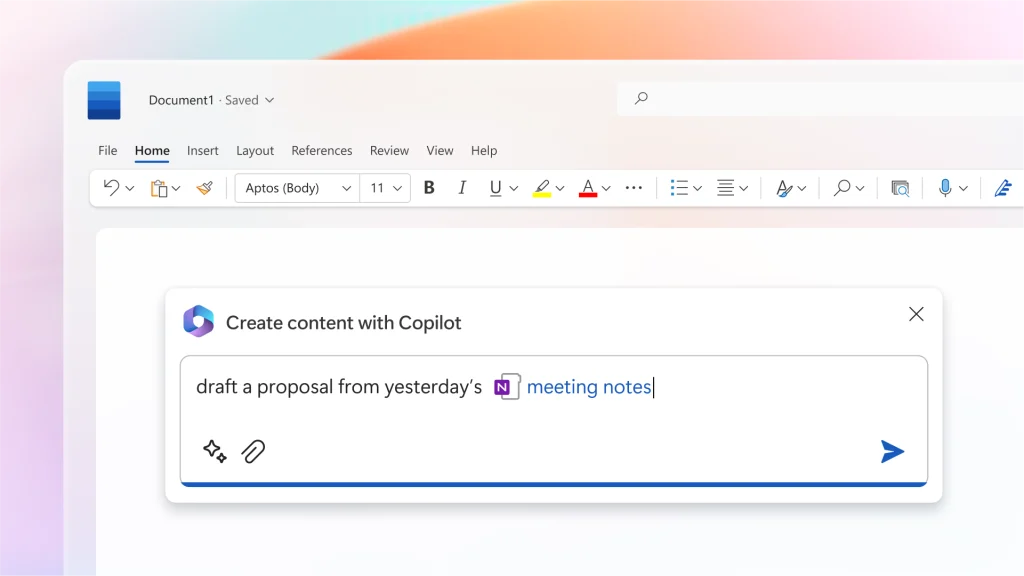
Copilot in Teams is pretty good. Most people in our organisation are using it extensively to take meeting notes, track actions, recap meetings, and prepare for the next meeting. It’s been a real asset for improving personal productivity.” Helen says.
“One of our teammates had a great use case. He fed in a series of rejection letters we’d received from an organisation and used Copilot to analyse them and come up with a template to avoid future rejections! People use it to draft and redraft documents and improve their language. Our reports are getting better thanks to Copilot.” says Helen.
She also touches on how she uses it as a talent and development lead.
“I use it to create content. I’ve built competency frameworks, job descriptions, and training sessions all from just using copilot.
Of course, the output isn’t perfect, and I still need to add my expertise, review, and refine it, but I’m now able to do the work of three or four people thanks to Copilot.”
What are some of the limitations you’ve encountered with Copilot?
“We’ve noticed Copilot can be very slow at times and sometimes it stops working for no reason. A prompt that worked perfectly fine yesterday might not work today. Those are technical issues Microsoft needs to sort out.”, Helen explains.
“There’s also an inconsistency in how Copilot works across different Microsoft 365 products. It’s just not well connected even though it’s the same product.” According to Helen’s experience.
The team also found Copilot functionality in Excel to be limited. “You’d think even if you don’t know Excel formulas you can use Copilot to get things done, but that’s far from true. You need to have a decent understanding of Excel to get the best out of it in our opinion.”
Copilot in PowerPoint functionality is also limited currently. While it can summarise large presentations effectively, it struggles with creating one from scratch, especially when working with branded templates and handling complex documents.
The art of prompting
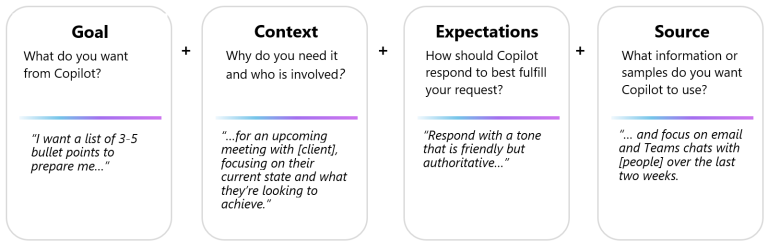
Access Partnership benefitted a lot from the early training they received from an external expert who also trained them on prompting. There was a phase of trial and error as the team learned how to prompt Copilot rightly. The internal champions of the program shared their leanings with the wider team and now they even set up a SharePoint site to document best practices, helping users to speed up quickly.
Helen shares some examples of good prompts for some very specific use cases that have worked well for the company.
For example, for personalised client interactions, they suggest using a prompt like
“Compose a personalised follow-up email to [Client Name], referencing specific features discussed during the product demo, addressing any concerns they raised, and proposing the next steps for potential collaboration.”
In preparation for a difficult client meeting, they suggest – “Using the framework of Non-Violent Communications (NVC), help me prepare for a difficult conversation with a client who keeps calling me with revisions and new ideas, which is increasing our costs and pushing our deadlines. I like this client as a person, but we’re at the risk of losing the business. Using NVC, How can I handle this conversation?”
Have you seen an ROI from Copilot yet?
“It’s too early to calculate the ROI for us”, says Helen. And to be honest, it’s not easy to quantify the returns on Copilot. But you can make some reasonable estimates.”
“So what we can say is that Copilot has easily saved at least 5% of our team’s time per day, though that’s probably an underestimation.”
She continues: “If we assume the time saved is instead spent on billable work, we would earn an extra £8500 a day. That’s the ROI right there.”
How Twisted Fish helped
Twisted Fish helped Access Partnership with all the information they needed at the beginning to make an informed decision on Copilot, including the security and citation aspects. Helen says: “Simon did a brilliant job in helping us understand what we were taking on board and what we weren’t. That was extremely helpful.”
While Access Partnership is fairly self-sufficient, they turn to Twisted Fish for support with any technical issues. “It feels reassuring to know they’re there in case we need help. We don’t have an in-house IT team, so I see Twisted Fish as my internal IT team. I lean on them whenever I have a query or problem.”
Do you have any advice for others looking to implement Copilot?
“We wouldn’t have done this if not for the commitment shown by our CEO, Greg. I think for any IT managers looking to invest in it, leadership support is crucial to get things moving.”
“If I were creating a business case, I’d focus on three things – personal productivity, creativity, and staying competitive. Don’t underestimate how much Copilot can help you save time in writing emails and finding documents in SharePoint or creating them from scratch. If you assume 5% time savings like we did, what would that mean in terms of additional revenue?
Creativity is another key benefit. Copilot can help you just generate ideas faster, so what’s the price of that? And finally, can you afford not to adopt AI? In your industry, if your competitors embrace AI and you don’t, will you be left behind?”
As for implementation, treat it just like any change program. Microsoft has some very good implementation and readiness toolkits, which we found massively helpful. If you’ve got your own IT department, work with them else rely on trusted partners like Twisted Fish.”, Helen concludes.
That’s it from us. Hope you found this conversation as helpful as we did. If you are looking to adopt Copilot in your organisation, get in touch with us to learn more about the use cases, and security considerations and seamlessly integrate Copilot into your workflow to improve your team’s productivity!